

When AI Makes Up the Numbers
Picture this. A small business owner opens an AI financial assistant and types: "Can I afford to buy this $5,000 piece of equipment?" The AI responds instantly, confidently, helpfully: "Based on your financial situation, you can comfortably afford this purchase." The owner signs the contract.
The problem? The AI made up the number. It never checked a bank balance. It never computed monthly cash flow. It never looked at runway. It pattern-matched on the phrasing of the question and generated a plausible-sounding answer, because that is what large language models are trained to do: be helpful.
This is not a hypothetical. This is the default behavior of any general-purpose LLM applied to financial questions. And in finance, the cost of a hallucinated number is not embarrassment. It is measured in dollars, in missed payroll, in contracts signed against phantom liquidity.
The root issue is structural. Language models are optimized for helpfulness. They would rather give you a wrong answer than say "I don't know." In most domains, that bias is a feature. In financial analysis, it is dangerous. The business owner asking "Can I afford this?" is not looking for encouragement. They are looking for a number they can trust enough to make a decision on.
I built AI Assist to solve this specific problem: give business owners CFO-level financial analysis without requiring a CFO, and never, under any circumstance, fabricate a number to fill in the gap. When the data does not support a conclusion, the system says so. When coverage is partial, it quantifies what is missing. When it is confident, it shows its work.
This post is a deep dive into how we built that system. The architecture, the tools, the tradeoffs, and the places we got it wrong.
Three Principles That Shaped Everything
Before I touch architecture, I want to explain the three design principles that constrained every decision we made. These are not guidelines. They are hard constraints baked into the system at every layer.
1. Data Sovereignty Over Inference. Every number in an AI Assist response must trace back to a tool call result. The system cannot extrapolate unless the user explicitly asks for a projection. This is enforced as a hard constraint, not a preference. It means the AI cannot answer a spending question without first calling the spending breakdown tool. It cannot assess affordability without pulling account balances, computing monthly cash flow over a 12-month window, and evaluating runway impact. Every answer is earned through data retrieval, not generated from pattern matching.
2. Graceful Degradation Over Silent Failure. When a tool errors out, when a model is rate-limited, when the context window fills up, the system must degrade openly. Tell the user what is missing, not fill in the gap. Tool execution errors return structured responses that the agent can reason about rather than crashing the loop. Every error is classified by type (validation, data access, timeout, unknown) and tagged with whether it is recoverable. The agent sees the classification and adjusts its strategy: retry with a narrower date range, use a different tool, or tell the user exactly what data is unavailable.
3. Depth Over Breadth on Every Query. A single question like "Can I afford a $5,000 purchase?" does not get a single-tool answer. It triggers a multi-dimensional analysis: current liquidity position across all connected accounts, monthly income versus expenses computed over 12 months of transaction history, available cash flow after recurring obligations, runway impact if the purchase proceeds, emergency fund ratio, and a confidence score reflecting how much data the analysis drew from. The system is designed to answer the question the user should have asked, not just the one they typed.
How AI Assist Thinks
Financial questions are inherently multi-step. "What are my monthly expenses?" sounds simple, but answering it well requires gathering transaction data, filtering by category, separating spending from non-spending outflows like transfers and loan payments, computing trends over multiple months, comparing against benchmarks, and identifying anomalies. A single LLM call cannot do this reliably.
AI Assist uses a Plan, Execute, Synthesize loop. The agent receives a question, decomposes it into data requirements, calls the necessary tools in sequence, observes the results, and synthesizes a response grounded in what it found. This is orchestrated through the Vercel AI SDK's streaming text interface with a configurable step limit.
The step limits are deliberate. The agent runs with a hard ceiling of 50 steps and a soft limit at step 40. When the agent reaches step 40, the system injects a notice into the conversation: "You are approaching the step limit. Begin synthesizing your findings and converge on a final answer." This prevents the agent from endlessly gathering data without concluding, a failure mode I have seen in every unconstrained agentic system I have built or evaluated.
The Scratchpad
The most important component in the loop is the scratchpad: an ephemeral, append-only working memory. Every time a tool returns a result, a structured entry is written to the scratchpad containing the step number, which tool was called, a summary of what was returned, and a timestamp. This scratchpad is injected into the system context at every step, giving the agent a running log of what it already knows.
When the scratchpad grows past 30 entries, which happens during deep analyses involving 15 or more tool calls, older entries are compacted into a summary paragraph using a lighter model from the secondary tier. The 20 most recent entries remain in full detail. This is a necessary tradeoff between context preservation and context window management. I will be honest about where it breaks later.
Tool Caching and Loop Detection
Two mechanisms prevent the agent from wasting steps. First, tool caching: when the agent calls the same tool with identical arguments within a single request, the cached result is returned immediately. The cache key is computed deterministically from the tool name plus a serialized representation of the arguments. This is common when the agent reasons its way back to the same data need from a different angle.
Second, loop detection: the scratchpad tracks how many times each tool has been called, with a default limit of three identical calls per tool. When the limit is reached, the agent receives a warning: "You may be in a loop, consider synthesizing from existing results." The system also uses similarity scoring on argument fingerprints to detect near-identical calls with slightly varied parameters, catching a subtler class of loops where the agent tweaks one filter on each iteration without making real progress.
Why We Run Three Models, Not One
AI Assist runs a deterministic model fallback chain: a primary model at 120 billion parameters with a 131,000-token context window, then a retry of the same model, then a secondary model at 20 billion parameters, then a tertiary model from a different architecture family at 70 billion parameters. This is not load balancing. It is a deliberate degradation strategy.
Why not just retry the primary? Because failures cluster. If the primary is rate-limited or overloaded, retrying it burns time against the same bottleneck. The secondary is smaller but faster, with a different failure profile. The tertiary is from a different model family entirely, providing architectural diversity. If the primary and secondary share a failure mode like a provider outage, the tertiary often remains available.
Error classification drives the retry logic. The system categorizes every failure into one of several classes: rate limit, timeout, context length exceeded, model overloaded, or request aborted. Each class gets different backoff timing. Rate limits get a longer base delay with exponential backoff. Timeouts get a shorter delay, since the failure was likely transient. All backoff calculations include random jitter to prevent thundering herd problems when multiple users hit the same limit simultaneously.
Here is the tradeoff I want to be upfront about: the secondary model at 20 billion parameters does produce less nuanced analysis. The reasoning is shallower, the synthesis is simpler, and it is more likely to miss subtle connections between tool results. We accept this because a slightly simpler response delivered in three seconds beats no response at all. In financial analysis, latency is its own form of inaccuracy. A question that times out is worse than a question answered with less depth.
Auxiliary tasks like scratchpad compaction, follow-up question generation, conversation title generation, and response validation never run on the primary model. They use the secondary and tertiary tiers exclusively, keeping the primary's capacity available for the main reasoning loop.
30+ Tools, One Coherent Financial Picture
The tool system is where AI Assist becomes more than a chatbot. The agent has access to over 30 purpose-built tools spanning nine categories. But the number is less interesting than the architecture around them.
Scoped Tooling: The Most Important Design Decision
Tools are conditionally registered based on what financial data the user actually has connected. When a request comes in, the system checks data availability: does this user have connected bank accounts? Investment accounts? Liability accounts? Recurring transaction data? Based on the answers, the tool set is assembled dynamically.
If a user has no investment accounts linked, the investment tools are never registered for that request. The agent cannot call them, cannot hallucinate about them, and does not waste reasoning steps attempting to use them. This sounds like a small optimization, but it is fundamental to agent efficiency. Every tool in the registry is a potential distraction. Removing tools the agent cannot productively use reduces the decision surface at every step of the loop.
Financial Data via Plaid
The foundation is real-time financial data from Plaid. Transactions, account balances, spending breakdowns by category and merchant, investment holdings and trade history, liabilities and debt summaries, recurring inflows and outflows (subscriptions, payroll, loan payments), and fuzzy merchant search with clustering. The spending breakdown tool is the workhorse. It loads a full historical dataset and aggregates by category, merchant, and month, giving the agent the raw material for almost any spending-related question.
Financial Planning Suite
Five tools handle forward-looking analysis. Cash runway projection computes how many months of operating expenses the current cash position covers. Cash flow forecasting projects monthly cash balances over a configurable horizon of 3 to 24 months. What-if scenario simulation lets the agent model changes: "What happens to my runway if I hire someone at $6,000 per month?" or "What if I lose my largest client?" The affordability analysis tool is the most complex. It pulls 12 months of transaction history, computes monthly income versus expenses, calculates available cash flow, evaluates impact on cash runway, and returns a confidence score between 0 and 1 along with explicit metadata about data quality (excellent, good, fair, or limited) and coverage. Financial health scoring produces a composite score from 0 to 100 with component breakdown across liquidity, cash flow ratio, savings rate, and spending stability.
Macro Economic Data via the FRED API
Six tools connect to the Federal Reserve Economic Data API: GDP growth, inflation rate, unemployment, Treasury yield curve, SBA loan rates, and consumer sentiment. Each series is cached at intervals matched to its update frequency. Quarterly data caches for 24 hours, monthly data for 12 hours, daily Treasury rates for 4 hours.
This is what separates AI Assist from a spreadsheet. When a business owner asks about SBA loan rates, the agent does not just pull the current rate. It fetches the Treasury yield curve, computes the spread, explains how SBA 7(a) rates are pegged to the prime rate, and contextualizes whether rates are rising or falling relative to the last six months. Personal finance in economic context, not in isolation.
SEC EDGAR Integration
The system queries SEC EDGAR for public company filings (10-K, 10-Q, 8-K), financial metrics (revenue, earnings, margins), and insider trading activity. The implementation includes a circuit breaker pattern with a minimum 110-millisecond interval between requests and a 60-second cooldown period when the circuit opens after receiving a 429 rate limit response. This is a detail that rarely gets discussed in agentic AI architecture, but it matters: public financial APIs are rate-limited, and agentic systems that call the same API multiple times within a single reasoning loop can easily exceed those limits. Without a circuit breaker, a single complex query could get the entire application throttled.
Code Execution via E2B Sandbox
For the long tail of financial questions that require custom computation, like "What is my spending trajectory if I exclude the one-time equipment purchase in March?" or "Show me a correlation between my revenue and my marketing spend," the agent has access to a secure Python sandbox powered by E2B. The environment comes pre-loaded with pandas, numpy, and matplotlib. The user's financial data is automatically injected as DataFrames before the agent's code runs. Execution is capped at 60 seconds, and all code passes through a safety validator that blocks access to system modules, subprocess execution, and dynamic code evaluation. The sandbox is created per-request and destroyed immediately after execution.
Web Search: Exa and Tavily
When the agent needs current market data, product pricing, or financial news that is not in the user's accounts or in FRED, it falls back to web search. Exa is the primary provider; Tavily is the automatic fallback. Each provider has its own retry logic: up to three attempts with exponential backoff and random jitter, and a 12-second timeout per attempt. If Exa fails after exhausting its retries, the system transparently switches to Tavily. The agent also has specialized search modes: product price search (which extracts and normalizes dollar amounts from search results) and financial news search (which returns structured article metadata with publication dates).
Document Intelligence via Supermemory
Users can upload financial documents like contracts, invoices, tax returns, and operating agreements, and the agent searches them using semantic retrieval powered by Supermemory. The search uses re-ranking with configurable chunk and document similarity thresholds, and supports hybrid mode: combining results from the user's uploaded documents with web search results in a single, unified context. Documents are prioritized over web results when both are available, because the user's own data is more relevant to their specific situation than generic web content.
Alerts and Visualizations
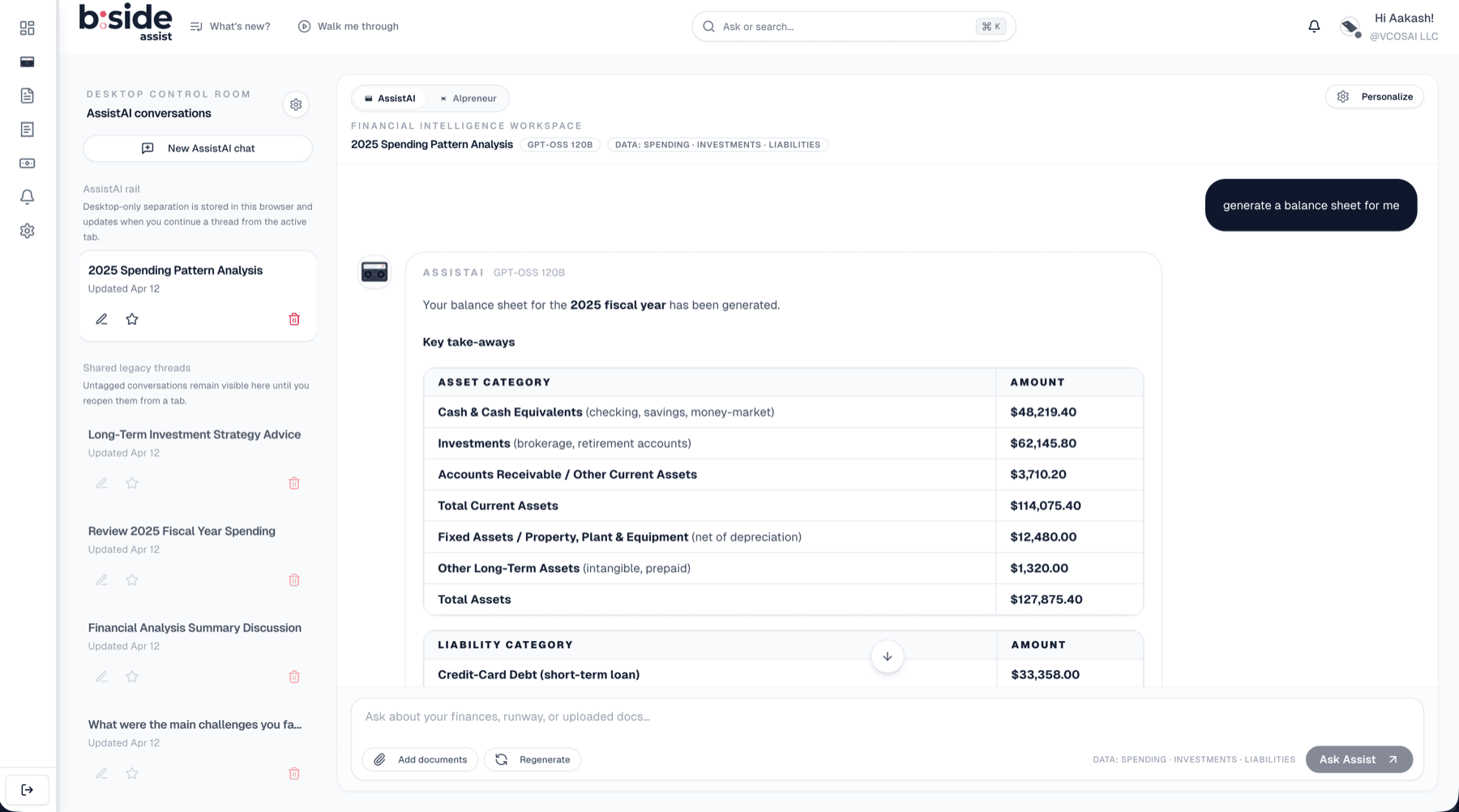
The agent can create financial alert rules like spending thresholds, balance warnings, and recurring charge monitors through a mutating tool that is explicitly excluded from the tool cache (because creating an alert should never be idempotent). On the output side, the agent generates rich visualizations: line charts, area charts, bar charts, pie charts, and styled financial statement tables (income statement, balance sheet, cash flow statement). These are streamed as separate bundles to prevent large JSON payloads from consuming the model's context window.
Making the Agent's Thinking Visible
AI Assist streams responses in real time using the native ReadableStream API. But the stream carries more than text. We embed structured event markers directly into the text stream, not as separate server-sent events, but as inline markers that the frontend parses on the fly.
Three marker types flow through the stream. Agent event markers carry structured data about tool invocations: which tool is being called, when it started, when it finished, whether it succeeded or failed, and how long it took. Follow-up markers carry an array of suggested next questions generated by a lighter model after the main response. Visualization bundle markers carry the chart and table specifications that the frontend renders as interactive components.
The decision to use inline text markers instead of a separate structured channel was deliberate. It keeps the response as a single stream, simplifies error handling (if the stream breaks, everything breaks together rather than one channel failing silently), and makes it trivial to replay a conversation from stored message content.
The transparency is a trust mechanism, not a technical feature. On the frontend, the client parses agent events to populate a real-time reasoning panel. The user sees, in real time, that the agent called the spending breakdown tool, then the accounts tool, then the financial health assessment, before producing its answer. They can see how long each tool call took. They can see if one failed and the agent adjusted.
This matters because the user's job is not "use an AI assistant." Their job is "make a confident financial decision." Seeing the agent's work, the tools it consulted, the data it gathered, is what transforms a generated response into an answer they are willing to act on. We did not build this for the technically curious. We built it because, in financial analysis, showing your work is not optional.
The Constraint Architecture
AI Assist operates under a structured reasoning protocol that enforces rigor at every step. The agent does not freeform its way to an answer. It follows a disciplined sequence: decompose the query into what the user actually needs, map those needs to specific data requirements, execute a multi-tool strategy to build a complete picture, apply variance analysis across time periods, and synthesize everything with explicit evidence. Every claim in the final response must be traceable to a tool result.
The system enforces hard data integrity rules. Numbers cannot be fabricated. Categories must match exactly what the financial data source returns. No synthetic groupings, no creative relabeling. Extrapolation requires explicit user consent. When the agent cites a figure, the underlying tool call is the source of truth.
Beyond responding to the user's question, the agent runs proactive insight triggers, conditions it checks automatically regardless of what was asked. Low savings rates, negative cash flow trends, unusual spending spikes, thin emergency fund coverage, and creeping recurring charges all get flagged without the user needing to ask. These are the things a good CFO would mention unprompted.
Every response includes data integrity metadata: the date range analyzed, the number of months covered, the transaction count, and a data quality rating (excellent, good, fair, or limited). This metadata is not buried in fine print. It is part of the response structure. If the agent analyzed only two months of data because the user connected their account recently, the response says so explicitly, and the confidence score reflects the limited coverage.
Opening the Platform
AI Assist is not just a feature inside B:Side Assist. It is also an API.
The B:Side Assist MCP server exposes 42 tools, the same ones the native agent uses, plus additional tools for conversation history, document management, notifications, and activity logs. Every tool has a Zod-validated schema defining its inputs and outputs. Authentication uses OAuth 2.0 with PKCE, supporting both personal access tokens and full OAuth authorization code flow.
Access is controlled through 18 granular scopes organized into six categories: Banking (connections, accounts, transactions, recurring streams, liabilities), Investments, Insights (derived analysis like runway and forecasts), Automation (alerts), Activity (notifications and audit logs), and Documents (indexed documents and semantic search). A client can request read-only access to transactions without being able to create alerts. A research tool can access macro economic data without seeing any personal financial information.
The architectural choice that matters most: the MCP server shares the exact same tool layer as the native AI Assist agent. There is no adapter, no separate implementation, no drift. When we improve the spending breakdown tool for the native agent, that improvement is immediately available to every external client that calls the same tool through MCP. When we add a new financial planning capability, it appears in both the internal agent and the external API simultaneously.
This turns B:Side Assist from a product into a platform. Any MCP-compatible client, whether it is Claude Desktop, a custom internal tool, or a third-party integration, can authenticate and access a user's financial data through the same tool infrastructure that powers the native experience.
What We Got Wrong
I want to be honest about two things that are active engineering challenges, not solved problems.
The system prompt is too long. The composed system context, including the core identity, grounding rules, reasoning protocol, tool selection playbook, variance analysis frameworks, proactive insight triggers, data availability context, tool manifests, thread memory, and personalization signals, is substantial. At peak, it consumes a meaningful fraction of the 131,000-token context window before the conversation even starts. This leaves less room for conversation history, tool results, and the scratchpad.
We mitigate this with thread summarization. When conversation history would exceed the available context budget, older messages are summarized by the secondary model and injected as a compressed context block. The 10 most recent messages always remain intact. But the tension between comprehensive agent guidance and context efficiency is real, and we are still progressively modularizing the prompt, loading only the sections relevant to the detected query type rather than the full playbook every time.
Scratchpad compaction is lossy. When the scratchpad exceeds 30 entries, older entries are summarized into a paragraph. This is necessary to keep the context window manageable, but it means the agent can lose granularity on earlier tool results during a long analysis. For truly deep investigations involving 15 or more tool calls, the agent is working with summarized early evidence rather than raw data.
We keep the 20 most recent entries intact, which covers most analyses. But I have seen cases where the agent needed to reference a specific transaction from an early tool call and could not, because that detail had been compacted into a summary. The right fix is probably hierarchical compaction, maintaining full detail for key results while summarizing routine observations, but we have not shipped that yet.
What We Actually Built
Let me return to where we started. A business owner asks: "Can I afford this $5,000 purchase?"
With AI Assist, the answer draws from 12 months of transaction history across every connected account. Monthly income and expenses are computed from actual data, not estimated. Available cash flow accounts for recurring obligations. Runway impact is modeled. The response includes an explicit confidence score and data quality metadata: how many months of data were analyzed, how many transactions contributed, whether the analysis is rated excellent, good, fair, or limited.
If data is missing, if the user connected their account two weeks ago and there is only one month of history, the system says so. The confidence score drops. The response explains what would make the analysis more reliable: "Connect additional accounts or wait until 90 days of transaction history are available for a higher-confidence assessment."
The core contribution of this work is not the number of tools or the size of the models. It is the constraint architecture: the system of scratchpads, loop detection, data grounding rules, graceful degradation, and transparent reasoning that makes a large language model safe to use in a domain where precision matters.
I built AI Assist because I believe the next generation of financial tools will not be dashboards. They will be conversations with agents that know when to call a tool, when to show their work, and when to say "I don't have enough data to answer that." The hard part was never making an LLM talk about money. The hard part was making it stop when it should.